How to Write Good Emails That Get Results Every Time
Unlock the secrets to effective email communication with proven strategies. Discover how to craft compelling subject lines, optimize for mobile, and personalize your messages to build stronger connections. Avoid common pitfalls and enhance your email writing skills today!
The modern inbox is a battlefield.
Hundreds of unread messages clamor for attention, confusing email chains obscure vital information, and important emails vanish into the digital ether. While everyone grapples with this influx, professionals who command clear, compelling email communication rise above the noise.
Mastering email isn't just a desirable skill; it's a necessity.
 The High Stakes of Email Communication
Poorly written emails are costly. Miscommunication, lost productivity, and even damaged relationships can stem from unclear or unprofessional emails. An ambiguous email can stall a project, while a rude tone can alienate a client.
Deciphering confusing emails consumes valuable time and resources, impacting a business's bottom line. This underscores the importance of investing in email writing training for employees.
Understanding the impact of email marketing on sales can significantly shape your writing approach. For practical advice, explore this resource on Email Marketing for E-commerce.
Traditional writing emphasizes formal language and complex sentences. However, the rapid-fire nature of digital communication necessitates concise, easily digestible content. People scan emails quickly, seeking key information. Lengthy, convoluted messages are often ignored or skimmed, leading to missed opportunities.
Adapting your writing style for digital platforms is crucial for maximizing impact.
The sheer volume of global email traffic is staggering and continues to climb, underscoring the need for effective writing. In 2018, approximately 281 billion emails were sent daily. By 2025, this number is projected to surge to 376.4 billion daily emails.
This escalating volume intensifies the challenge of capturing attention in an overflowing inbox. With email users anticipated to exceed 4.6 billion globally by 2025, the competition for attention is fiercer than ever.
More detailed statistics are available here.
Building Relationships Through Email
Thoughtfully written emails can cultivate strong professional relationships. A personalized thank-you note, a concise project update, or a brief check-in can foster connection and build trust.
This is particularly valuable in today's remote work environment, where face-to-face interaction is less frequent. Well-crafted emails demonstrate professionalism and respect for the recipient’s time, enhancing your reputation.
Mastering email writing transcends simply conveying information; it's about building bridges and fostering positive impressions.
Subject Lines That Get Your Emails Opened
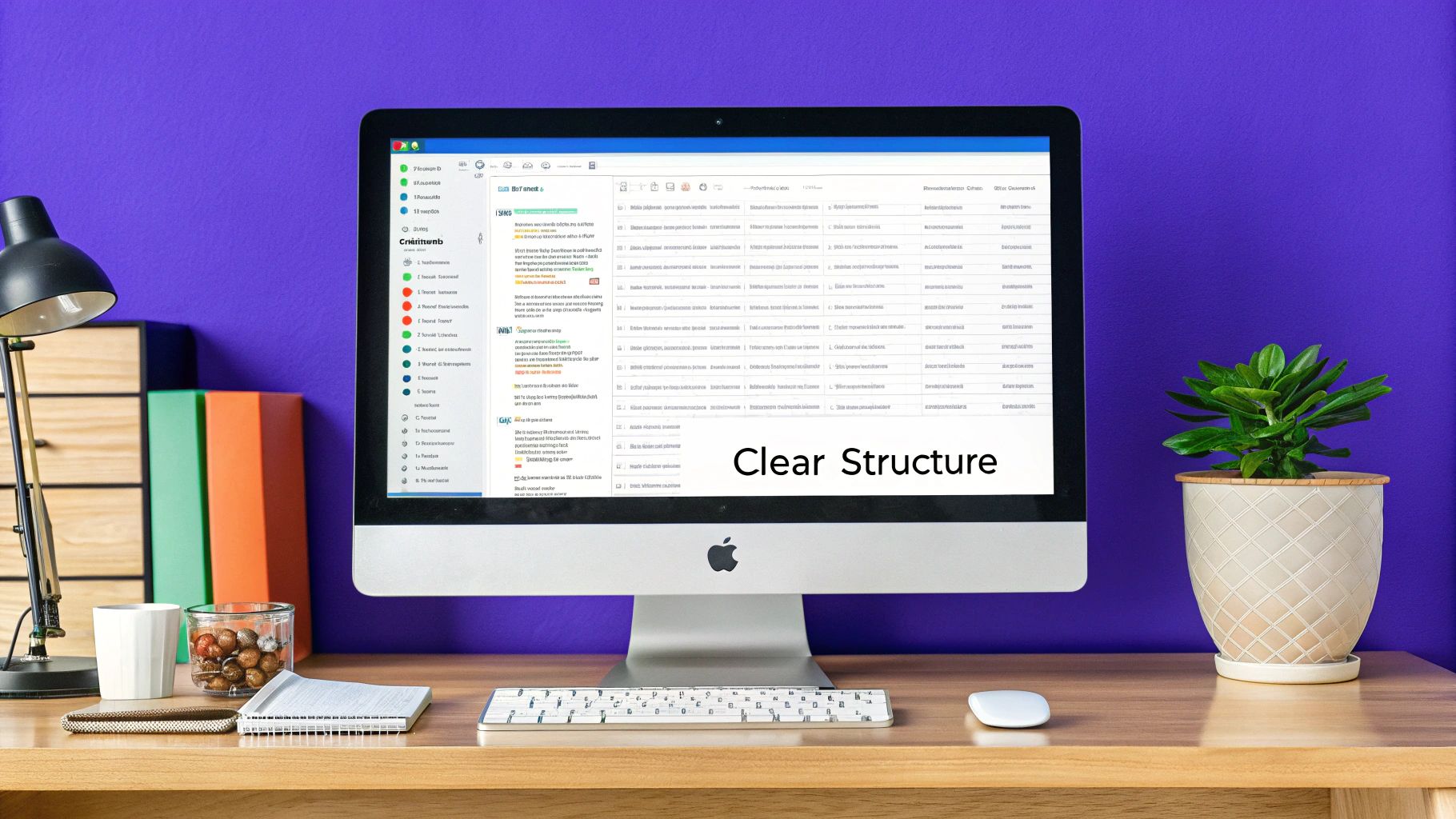 A well-crafted email is pointless if it goes unopened. The subject line is the gateway to your message, the first impression. It needs to grab attention.
By analyzing successful email campaigns and leveraging marketing best practices, we can understand how to craft subject lines that truly resonate.
The Psychology of Clicking: Why We Open Emails
Effective subject lines begin with understanding recipient behavior. People open emails that offer value, pique their interest, or create a sense of urgency. Therefore, subject lines must connect with the audience's needs. A subject line like "Boost Your Productivity by 20%" taps into the desire for self-improvement, while "Limited-Time Offer: Get 50% Off" uses urgency as a motivator.
Understanding cold email strategies can significantly enhance overall email marketing effectiveness, particularly for managed service providers (MSPs) reaching out to potential clients. For further insights into this approach, explore: Cold Email Tips For Msps In 2020.
Crafting Compelling Subject Lines: Tips and Tricks
Strong subject lines are essential for email success. Here are some key considerations:
Brevity is Key: Keep subject lines under 50 characters to ensure full visibility on mobile devices.
Personalization: Use the recipient's name or company name to establish a connection.
Numbers: Quantifiable value, like "5 Tips for Writing Better Emails," attracts attention and boosts open rates.
Action Words: Begin subject lines with action verbs to encourage immediate engagement.
A/B Testing: Finding What Works for You
One size doesn't fit all in email marketing. A/B testing, sending two versions of your subject line to a small group and analyzing their performance, is essential. This allows for optimization and targeted refinement.
Tools like quiky.email can assist with this process.
Beyond the Basics: Advanced Subject Line Strategies
Emojis can add personality, but use them judiciously. Sparking curiosity is powerful. A subject line like "You Won't Believe What Happened Next" can be highly effective, but the content must deliver on the implied promise.
Misleading subject lines erode trust and increase unsubscribes. Finding the balance between intrigue and accuracy is key.
Examples of Effective Subject Lines
The following table provides examples of effective subject lines:
Type of Email | Effective Subject Line Example | Why It Works |
|---|---|---|
Welcome Email | Welcome to the Community! | Simple, welcoming, and sets expectations |
Promotional Email | Exclusive Offer Just for You! | Creates a sense of exclusivity and value |
Newsletter | 3 Tips to Improve Your Writing | Offers concrete, actionable advice |
Follow-Up Email | Checking In on Your Progress | Personalized and shows genuine interest |
By implementing these tips and continually adapting your strategy, you can significantly improve email open rates and ensure your message reaches its intended audience.
Writing Emails That Work On Every Device
 Crafting effective email communication involves more than compelling content. It requires ensuring your message resonates regardless of the recipient's device.
Optimizing emails for mobile is now crucial for reaching a broad audience. This necessitates reconsidering traditional email design and adopting a mobile-centric approach.
Why Mobile Optimization Matters
Mobile optimization is essential for modern email marketing. By 2025, 41.6% of email opens will occur on mobile devices, surpassing both webmail and desktop clients. With approximately 1.7 billion people primarily using mobile phones for email, the importance of cross-device compatibility is clear. Furthermore, 42.3% of users delete emails that don't render properly on their phones. This highlights the risk of losing a significant portion of your audience due to poor mobile optimization.
For more detailed email statistics, see this blog post.
Strategies for Mobile-First Email Writing
Creating easily digestible emails for on-the-go readers requires a strategic approach:
Short Paragraphs: Keep paragraphs concise (2-4 sentences) for easy reading on smaller screens.
White Space: Utilize white space effectively to improve readability and avoid a cluttered appearance on mobile.
Clear Formatting: Employ bullet points, numbered lists, and bold text to highlight key information, enabling readers to quickly grasp the main points.
Optimizing Email Length for Mobile
While email length varies depending on content, shorter emails are generally preferred for mobile. Aim for content readable within one to two minutes, focusing on conciseness and avoiding unnecessary jargon.
Formatting Techniques for Scannability
Mobile users tend to scan emails rather than read them thoroughly. Enhance scannability with clear formatting:
Bold Text: Emphasize key takeaways and important information with bold text.
Bullet Points: Deconstruct complex information into digestible bullet points.
Headings: Use headings to organize content and guide the reader's eye.
To understand how different devices impact email opens, consider the following table:
Email Open Rates by Device Type
Comparison of how recipients access and engage with emails across different devices
Device Type | Open Rate % | User Behavior | Optimization Priority |
|---|---|---|---|
Mobile | 41.6% | Often scan emails quickly; prioritize concise content and clear formatting | High |
Webmail | (Lower than Mobile by 2025) | May have larger screens but still prioritize scannability | Medium |
Desktop | (Lowest by 2025) | Typically read more in-depth | Medium |
This table illustrates the dominance of mobile in email opens and highlights the need for mobile-first design. The user behavior underscores the importance of optimizing for quick consumption on smaller screens.
Using AI Tools to Supercharge Your Email Writing
AI is changing the way we write emails. It's not about replacing human writers, but about providing them with powerful tools to refine their process, enhance their creativity, and ultimately, drive better results. This isn't about robotic-sounding emails, but about strategically using AI to improve communication effectiveness.
How AI Can Enhance Your Email Writing Process
AI tools provide a variety of functionalities that can significantly elevate your email communications. Think of them as intelligent assistants, capable of handling a range of tasks:
Generating First Drafts: AI can overcome writer's block by creating an initial draft based on your key points. This saves time and effort, especially for routine emails or when you need a jumpstart.
Improving Clarity and Conciseness: AI can analyze your writing and suggest edits to make your message more direct and impactful. This is crucial for effective business communication where clarity is paramount.
Personalizing Content at Scale: Tailoring emails to specific audiences is made easier with AI. It suggests personalized greetings, subject lines, and content variations based on recipient data, boosting engagement and conversion rates.
Enhancing Subject Lines: AI analyzes the effectiveness of subject lines and suggests improvements to increase open rates, drawing on best practices and data-driven insights.
Proofreading and Editing: AI-powered grammar and spell checkers catch errors that might otherwise slip through, ensuring your emails are polished and professional.
Prompt Engineering for Effective AI Email Writing
The key to successful AI email writing is prompt engineering: crafting effective instructions for the AI. A vague prompt will yield generic results. Be specific and detailed:
Define Your Target Audience: Specify who the email is for (e.g., "a potential client interested in software development services").
Specify the Email's Purpose: State the desired outcome (e.g., "to schedule a demo").
Provide Context and Key Information: Include relevant details about your product, service, or previous interactions.
Set the Desired Tone and Style: Indicate whether you want the email to be formal, informal, persuasive, etc.
Example Prompt: "Write a follow-up email to John Smith, CEO of Acme Corp, who downloaded our whitepaper on cloud security. The purpose is to invite him to a webinar on the topic. The tone should be professional yet friendly."
Detailed prompts empower the AI to generate relevant and impactful content.
Editing and Refining AI-Generated Content
While powerful, AI tools are not perfect. Always review and edit AI-generated content for accuracy, brand voice, and personalization. The AI is a starting point, not the end. Focus your edits on:
Fact-Checking: Verify any information from the AI, especially statistics and data.
Tone and Style: Ensure the language aligns with your brand and resonates with your audience.
Personalization: Add specific details about the recipient for a more personal touch.
For instance, email marketing is increasingly using AI. In the US, 70% of marketers now use generative AI tools, with 34% using them for email copy. AI-driven campaigns see a 13% increase in click-through rates and a 41% rise in revenue compared to traditional methods. Learn more about these statistics. This demonstrates the growing importance of AI in email marketing strategies.
Choosing the Right AI Email Writing Tool
Many AI tools are available, from general platforms like ChatGPT to specialized email assistants. Quiky.email offers tools for various email tasks, from composing messages to generating replies and subject lines. Experiment to find the tools that best suit your workflow and consider factors like:
Ease of Use: How intuitive is the interface and how quickly can you get results?
Customization Options: Can you tailor the output to your specific requirements?
Integration with Existing Tools: Can the tool integrate with your email client or CRM?
Pricing: Does the pricing model fit your budget and usage?
By strategically selecting and implementing AI email writing tools, you can considerably improve your communication effectiveness. The goal is not to let AI take over, but to use it as a powerful tool to enhance your email writing skills.
Resources like the Email Writer and Subject Line Generator from Quiky.email can be valuable assets in this process.
Email Structure That Guides Readers to Action
Great emails aren't simply well-written; they're strategically structured to guide the reader toward a specific action. By analyzing high-converting emails and incorporating communication specialist insights, we can dissect the anatomy of effective email communication. This understanding empowers you to create emails that resonate with your audience and achieve your objectives, whether it's boosting sales outreach or effectively delivering internal updates.
Creating a clear structure for your emails is like providing a roadmap for your readers. A well-defined structure ensures that your readers can easily navigate your message and quickly grasp key pieces of information. This is especially important in today’s fast-paced environment, where many people only scan their emails for pertinent details. Without a clear structure, your core message risks getting lost. Simple formatting tools like headings and bullet points can significantly improve readability and highlight those key takeaways.
The Inverted Pyramid: Prioritizing Information
The inverted pyramid is a valuable structural technique. This method places the most important information at the beginning of the email. Start with your main point, followed by supporting details, and conclude with less critical information. This strategy acknowledges the common practice of email scanning, making sure your core message is absorbed even with a cursory read.
Framing Your Email By Purpose
Different types of emails call for different structural frameworks, much like the varied structures used for short stories versus research papers. A sales outreach email requires a concise and persuasive pitch combined with a clear call to action.
In contrast, an internal communication email often prioritizes updates and action items, requiring a more detailed and structured approach. For a deeper dive into email creation, explore this helpful article: How to master email creation.
To help visualize best practices across different email types, the following table provides a quick reference guide:
Email Type | Opening Style | Body Structure | CTA Approach | Ideal Length |
|---|---|---|---|---|
Sales Outreach | Engaging hook, value proposition | Concise, benefit-driven | Clear, compelling offer | Short and sweet (under 150 words) |
Internal Update | Direct and informative subject line | Structured with headings, bullet points | Specific next steps, deadlines | Concise and detailed as needed |
Newsletter | Attention-grabbing headline | Scannable sections, visuals | Multiple CTAs for different content | Varies based on content |
Customer Service Response | Personalized greeting, acknowledgement | Clear solution, helpful resources | Follow-up instructions, feedback request | As long as needed to address the issue |
This table highlights how the purpose of your email should dictate its overall construction, from opening style to the length of the message. Adapting your approach for different email types ensures clarity and maximizes impact.
The Power of Visual Hierarchy
Reading patterns significantly influence email design. A visually engaging email with a defined hierarchy allows readers to quickly identify and process information.
Simple formatting choices like using bold text for key information, separating text into short paragraphs, and including white space dramatically improve the readability of your emails.
Crafting a Call to Action That Converts
The call to action (CTA) is the core driver of your email. It directs readers toward the specific action you want them to take. However, an overly aggressive or generic CTA can be detrimental. This infographic demonstrates how seemingly small details like proofreading can significantly impact response rates: 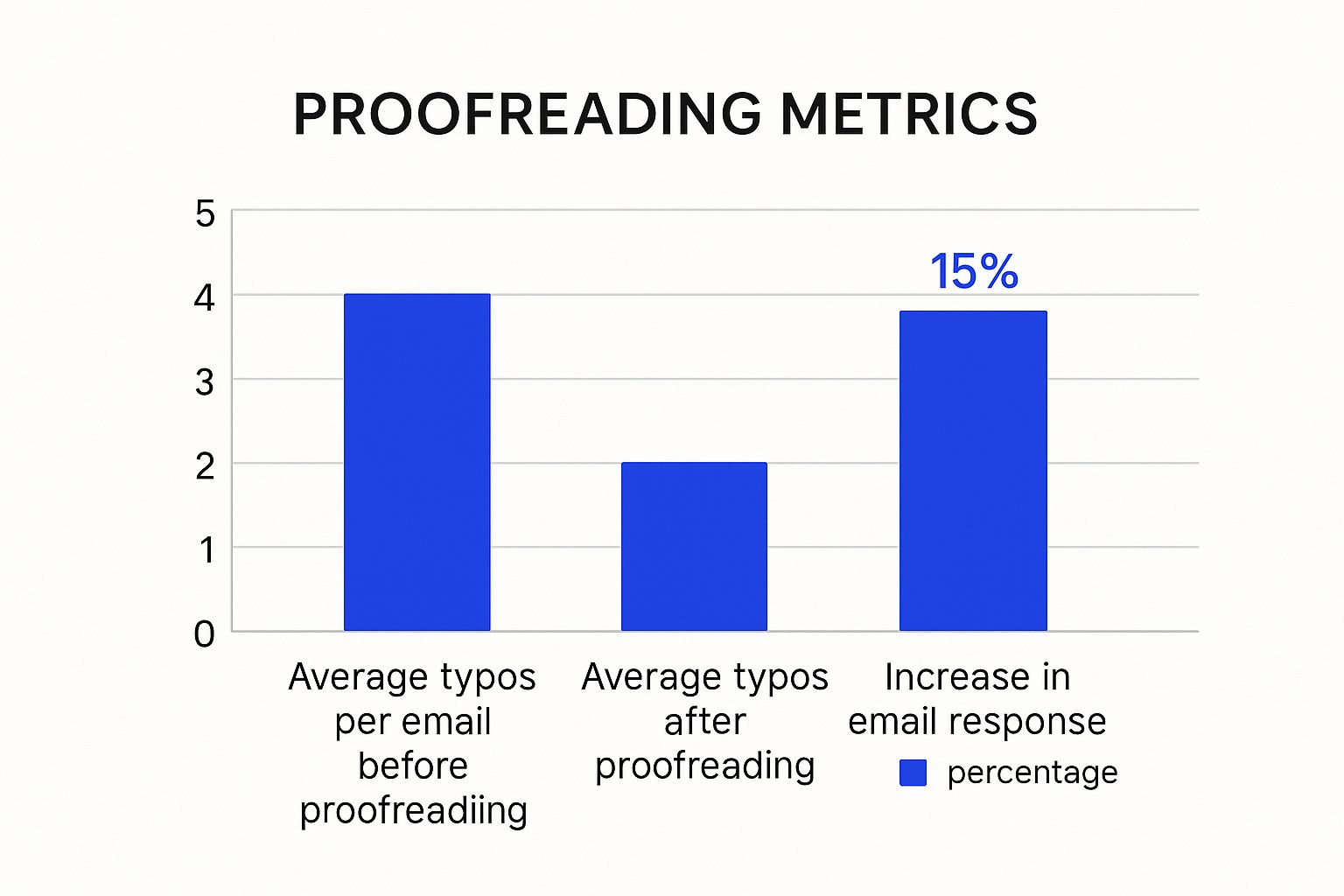 As the infographic highlights, reducing typos from an average of 5 to 1 correlates with a 15% increase in email response rates. This underscores the impact of careful proofreading on overall professionalism. An effective CTA uses clear, action-oriented language, a visually prominent design, and personalization whenever feasible.
Adapting Your Strategy For Audience and Goals
The most successful email structure ultimately depends on both your target audience and your communication goals. Consider your audience's preferences and what they expect from your communication. Understanding what type of language resonates with them and what information they are most likely to be seeking allows you to tailor your email's structure and tone. By making these adjustments, you can maximize your impact and achieve your desired outcomes.
Personalization Strategies That Build Real Connections
Forget the generic "Hi [First Name]" emails. True personalization goes much deeper, creating authentic connections and driving significantly better results. It's like the difference between a generic, off-the-rack suit and a bespoke one, tailored perfectly to the individual. This level of personalization makes a powerful statement. Let's explore how to craft emails that truly resonate with each recipient.
Researching Your Audience: Beyond the Basics
Understanding your audience is the cornerstone of personalization. It's about going beyond basic demographics and becoming a detective, uncovering their motivations and preferences. What are their pain points? What solutions are they seeking? What language do they use? By digging deeper, you can tailor your message to their specific needs.
Segmentation: The Power of Targeted Communication
Segmentation is critical for effective email marketing. It involves dividing your audience into smaller groups based on shared characteristics, such as industry, job title, or past purchase behavior.
This allows you to send highly relevant content that speaks directly to each group's unique needs and interests. Much like catering a dinner party, you wouldn't serve the same meal to everyone. Tailoring email content based on segmented groups enhances engagement and builds stronger connections.
Behavioral Triggers: Understanding What Makes Your Audience Tick
Behavioral triggers are actions or events that initiate specific email communications. These can include website activity, email opens, or even social media interactions. Triggers enable timely, relevant communication. For example, if someone abandons their shopping cart, a personalized email reminding them of their items and offering a small discount can be highly effective. Similarly, sending targeted content based on a user's website browsing history demonstrates that you understand their interests.
Balancing Personalization and Privacy
While personalization is powerful, respecting privacy boundaries is essential. It’s a delicate balance. Overly intrusive personalization can be counterproductive and erode trust. Always obtain explicit consent for data collection and be transparent about how you use their information. Focus on being helpful, not intrusive.
Personalizing Tone, Content, and Timing
Personalization extends beyond simply using someone's name. It's about crafting a message that speaks to their specific needs and context. Tailor your tone to match your relationship with the recipient. A formal tone might suit a new client, while a more casual tone works for a long-term customer. Timing is also crucial. Sending emails at the optimal time, when your audience is most likely to engage, maximizes impact.
Scaling Personalization: Maintaining Authenticity
Scaling personalized communication can be challenging. AI-powered tools like quiky.email can help automate the process while preserving authenticity. These tools can generate personalized email templates, subject lines, and even content variations. However, ensure the final product retains a human and genuine feel. Think of these tools as assistants, not replacements. The goal is to enhance, not eliminate, your authentic voice. By combining technology with a human touch, you can personalize communication at scale and build meaningful connections with every recipient.
Key Takeaways
Your practical roadmap for email writing success begins now. This guide distills proven strategies and real-world results into actionable checklists, setting realistic goals and providing clear metrics. These takeaways equip you with techniques to transform your emails, highlighting potential pitfalls and benchmarks for success. This isn't simply about composing emails; it’s about effective communication that drives tangible results.
Subject Lines: The First Impression
Your subject line is the first impression, the gatekeeper to your message. It must compel recipients to click.
Curiosity Gap: Employ the "curiosity gap" – pique interest without revealing everything. Instead of "New Product Launch," try "The Secret We've Been Hiding." This entices recipients to open the email and discover more.
Personalization: Use the recipient's name or company name to forge a connection, making the email feel less like mass communication and more personal.
Brevity: Keep subject lines concise, ideally under 50 characters, for optimal mobile display. Short, punchy subject lines are more likely to be read fully on smaller screens.
A/B Testing: Experiment with different subject lines. A/B testing allows you to analyze which versions perform best and refine your approach based on data-driven insights.
Mobile Optimization: Reaching Everyone, Everywhere
With 41.6% of emails opened on mobile devices, mobile optimization is crucial. A significant portion of your audience will delete emails that don't display well on their phones. This means crafting concise emails that are easily digestible for readers on the go. Imagine trying to decipher a dense, paragraph-heavy email on a small screen during a commute; formatting is key.
Short Paragraphs: Use short paragraphs (2-4 sentences maximum). This improves readability and makes emails easier to scan on smaller screens.
White Space: Implement white space effectively. White space breaks up the text, making emails visually less overwhelming and easier to navigate on mobile.
Formatting: Use bullet points, numbered lists, and bold text to highlight key information. This allows recipients to quickly grasp the main points, even while skimming.
AI Tools: Your Email Assistant
AI isn't a replacement for good writing; it's an enhancement. AI tools offer opportunities to improve your email writing process. Think of it as having an editorial assistant, helping you:
Generate First Drafts: AI can help overcome writer's block and create initial drafts quickly. Provide context and key information, and let the AI generate a starting point.
Enhance Clarity: AI can analyze writing and suggest improvements for clarity and conciseness, ensuring a more impactful message.
Personalize at Scale: AI can help tailor emails to specific audiences by suggesting personalized greetings and content variations based on recipient data.
Remember to always review and edit AI-generated content to maintain your authentic voice and ensure accuracy. AI is a powerful tool, but human oversight remains essential.
Structure: Guiding Readers to Action
Effective emails are like well-designed roads, guiding readers to a destination—your call to action (CTA). Imagine navigating a city without street signs or a map; your email structure serves as that guide.
Inverted Pyramid: Start with the most crucial information and follow with supporting details. This structure caters to readers who scan emails, ensuring your key message is delivered upfront.
Call to Action (CTA): Make your CTA clear, concise, and action-oriented. Use strong verbs and tell the reader exactly what you want them to do. Instead of "Learn More," consider "Download Your Free Guide Now."
Personalization: Building Genuine Connections
True personalization goes beyond simply inserting a first name. It involves making the recipient feel understood. Think of it as receiving a handwritten letter versus a generic postcard; the personal touch strengthens the connection. This doesn’t mean invading privacy, but rather using available information thoughtfully.
Research: Go beyond basic demographics. Understand your audience's interests, pain points, and goals. These nuances allow you to tailor your message effectively.
Segmentation: Divide your audience into smaller groups with shared characteristics and tailor content accordingly. This ensures relevance and resonance with specific segments.
Tone and Timing: Adjust your tone based on your relationship with the recipient. Send emails at times they are most likely to engage.
By implementing these key takeaways, you can transform your emails from overlooked messages into powerful communication tools that achieve results. Start creating effective emails with Quiky.email today!
Key Takeaways
Essential learnings that you should remember from this article
- Craft compelling subject lines to increase open rates.
- Optimize emails for mobile devices to reach a wider audience.
- Utilize AI tools to enhance clarity and personalization in your emails.
Practical Tips
Actionable tips you can apply immediately to improve your email performance
Keep Subject Lines Concise
Limit subject lines to under 50 characters for better visibility on mobile devices.
Use the Inverted Pyramid Structure
Start with the most important information to ensure your key message is received, even by skimmers.
A/B Test Your Emails
Experiment with different subject lines and email formats to find what resonates best with your audience.
Common Mistakes to Avoid
Pitfalls and misconceptions to avoid when writing persuasive emails
- Using overly complex language that can confuse readers.
- Neglecting mobile optimization, leading to poor readability on smartphones.
- Failing to personalize emails, making them feel generic and less engaging.
Tools to Apply These Concepts
Put what you've learned into practice with these specialized tools
Related Content
Continue exploring with these related articles and tools